
Why you should use increment loaders in your front end projects?

There are lots of things in front end development that can make our lives easier by not bringing annoying bugs that can be averted in first place by taking simple decisions. One of the simple decisions that this blog shall cover is using incremental loader.
What does loader mean and what is the problem with normal loader that we use?
Loader (at least in this blog) is a component that would determine whether we should show a loading screen. We show loading screen when we fetch data (via API for example) or render our website.
Normally in React.js (and I assume in other frameworks and languages) we would calculate whether we should show a loading screen by using a boolean based loader. We would initialize this loader in Redux or UseContext hook or other similar state management solutions.
First we will initialize the variable.
const initialState = {
    loader: false
}
And in our loading component, we would check whether this loader is true or false.
if(loader === true) {
    return <LoadingScreen/>
}
And whenever we want our code to show loading screen we would dispatch the loader variable to true and later turn it to false.
async callApi () {
    try {
        dispatch(setLoader(true))
        await axios.get(${someRandomAPIEndpoint})
        // some further processing
    } catch (err) {
        // error handling
    } finally {
        dispatch(setLoader(false))
    }
}
This works perfectly if you are going to call one single API endpoint at a time. Your loader would set true on the start of the function, execute the program and in the finally block after the program is executed the loader would set as false.
But in large applications that is not the case. Take this piece of code as an example.
async callApi () {
    try {
        dispatch(setLoader(true))
        await axios.get(${someRandomAPIEndpoint})
        // some further processing
        await callApi2();
    } catch (err) {
        // error handling
    } finally {
        dispatch(setLoader(false))
    }
}


async callApi2 () {
    try {
        dispatch(setLoader(true))
        await axios.get(${someRandomAPIEndpoint})
        // some further processing
        const items = await callApi3();
        await callApi4();
    } catch (err) {
        // error handling
    } finally {
        dispatch(setLoader(false))
    }
}


async callApi3 () {
    // some pieces of code to call API endpoint
}

async callApi4 () {
    // some pieces of code to call API endpoint
}
callApi function initially calls one API endpoint and then while doing some processing it further calls another API endpoint (callApi2 function) which then calls another 2 API endpoints down the line. This is how you would expect your loaders to behave.
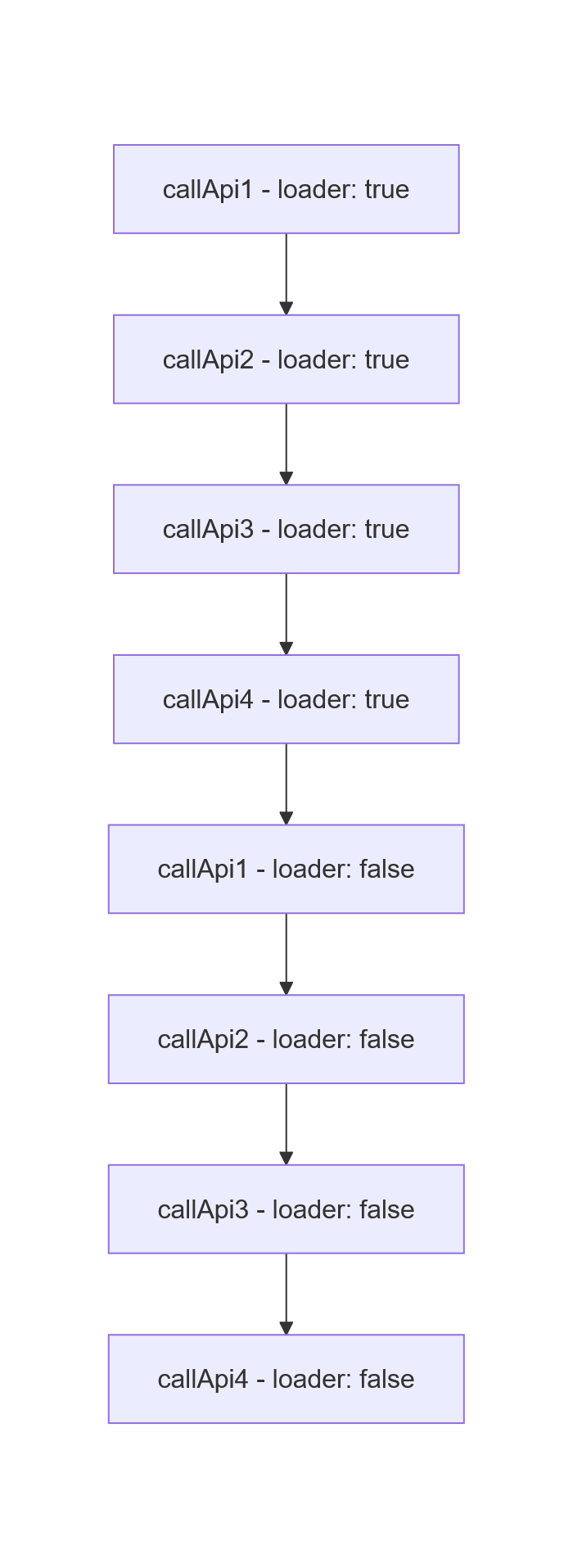
But the problem here is that in real time applications data fetching would not always happen in milliseconds and some API endpoints can send responses faster. So when you call bunch of API endpoints in a flow, the data fetching is not guaranteed to be done in sequential way.
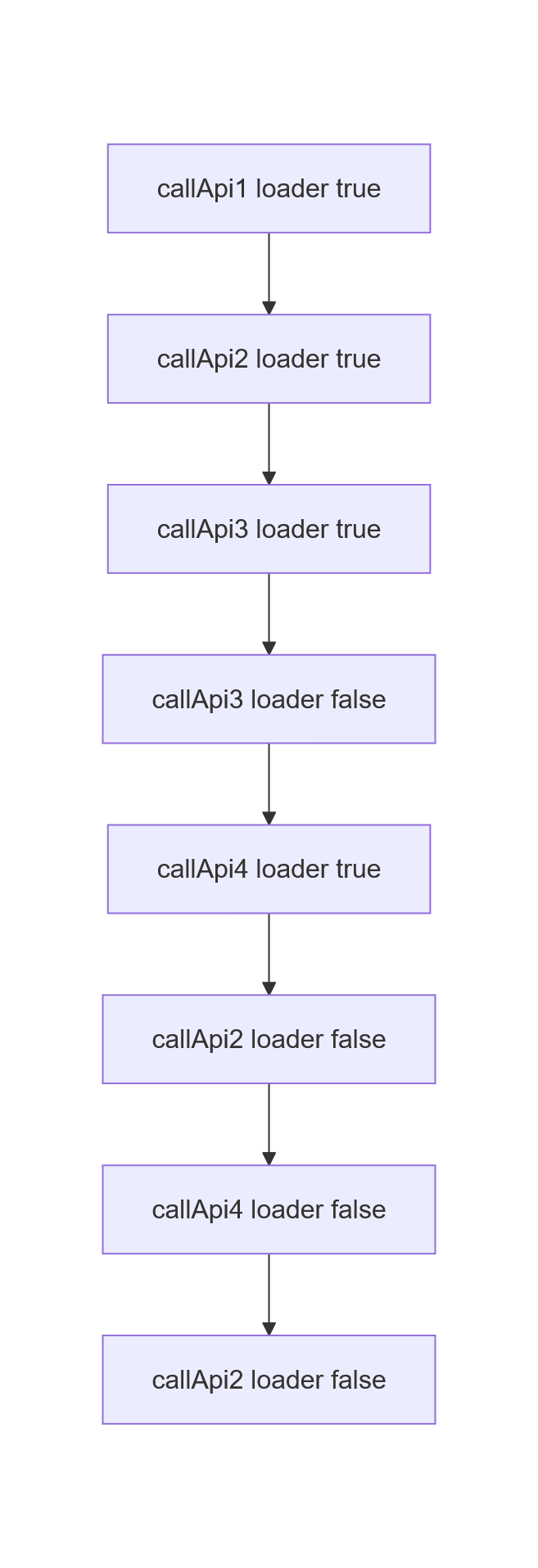
Take a look at the above flow. callApi3 function executes faster than intended since the API endpoint returned result faster and thus the other processing happened faster and the function’s finally block dispatches false for the loader even though the other processes across other functions maybe still happening! This means that the loader screen would stop being displayed even though the other API calls may be still going on. Another problem these kind of scenarios would bring is loading screen flickering effect.
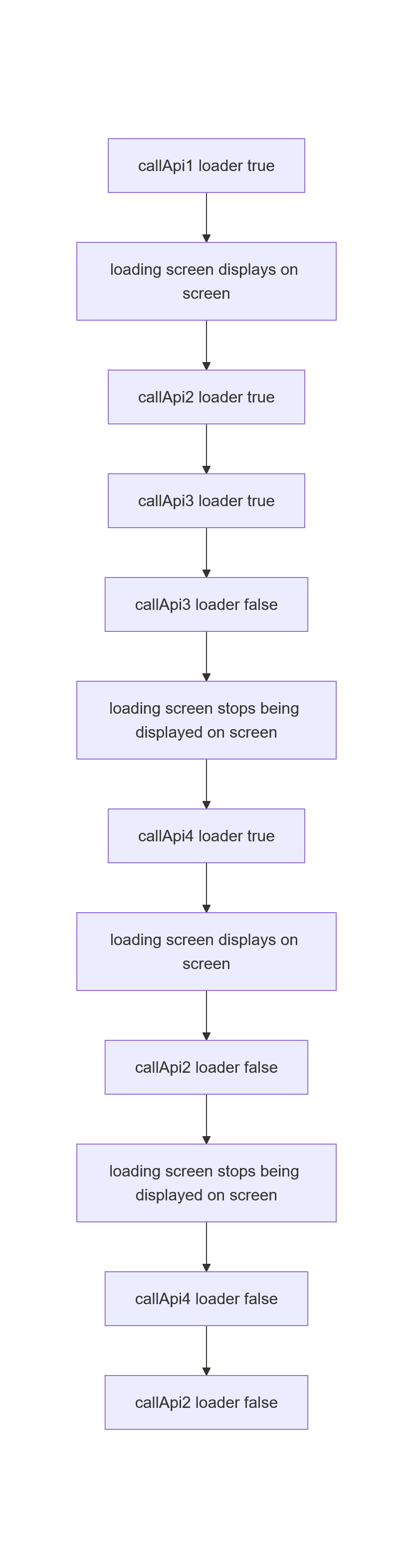
The solution? Incremental loader
Incremental loader does not work on the truth of boolean value rather the count of the loaders that are running on current time. Previously on the loading screen component we checked whether the loader is true or not. But for the incremental loader we would check whether the count is 0 or not.
if(loaderCount === 0) {
    return <LoadingScreen/>
}
As for calling the loader it would be like your wish too. You can either follow the same way you dispatch the boolean based loader or increase the count from the dispatch function itself.
// this is one way
async callApi () {
    try {
        dispatch(setIncrementalLoader(true))
        await axios.get(${someRandomAPIEndpoint})
        // some further processing
    } catch (err) {
        // error handling
    } finally {
        dispatch(setIncrementalLoader(false))
    }
}

// well, if you want different dispatch functions for increasing and decreasing the count
async callApi2 () {
    try {
        dispatch(setIncrementLoaderCount())
        await axios.get(${someRandomAPIEndpoint})
        // some further processing
    } catch (err) {
        // error handling
    } finally {
        dispatch(setDecrementLoaderCount())
    }
}
It does not matter as long as you can properly do the things on the action handler.
case SET_INCREMENT_LOADER: {
    if(action.payload === true) {
        return {...state, loaderCount: state.loaderCount + 1}
    } else {
        return {...state, loaderCount: state.loaderCount - 1}
    }
}
case INCREMENT_LOADER_COUNT: {
    return {...state, loaderCount: state.loaderCount + 1}
}
case DECREMENT_LOADER_COUNT: {
    return {...state, loaderCount: state.loaderCount - 1}
}
And how this can resolve the flickering effect?
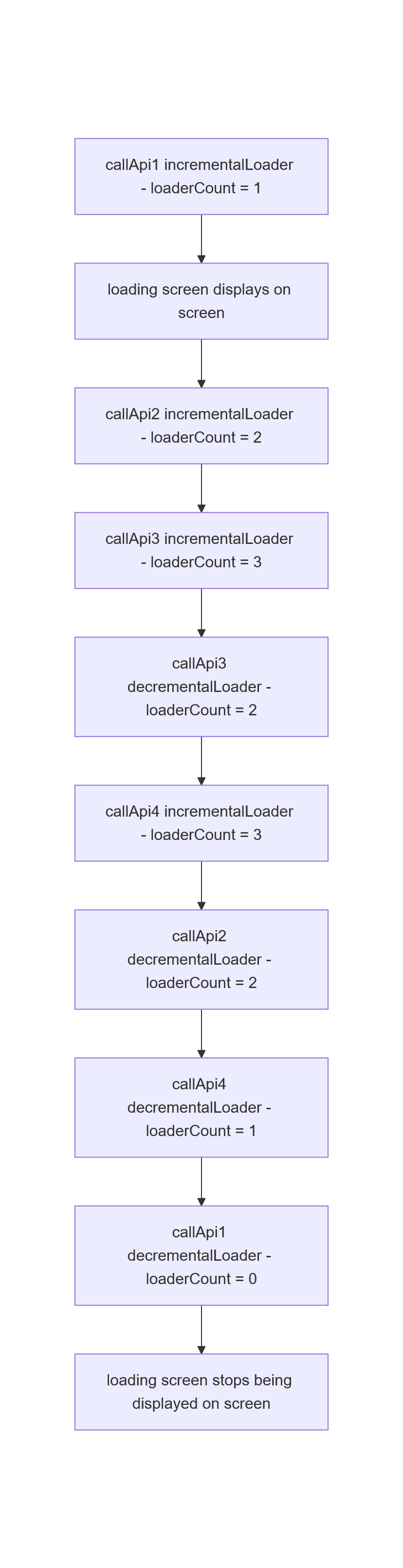
Right from the moment when the first incremental loader has been dispatched, the loader screen started showing on adding a value on loaderCount. Then other functions started executing on the line and the value on the loaderCount kept on being increasing. Now, the way we check whether we should display the loading screen or not is based on checking whether the value of the loaderCount is zero or not so even if any of the functions gets executed before we anticipated the loading screen still be displayed since the value would not be zero. Thus, not only it stops the flickering issue, but also the problem of loading screen being closed before the UI rendering since we only close the loading screen after all the functions execute their finally block.